Engineering QA & costing for steel fabricators

From STEP model to quote in minutes.

ENRIVIA reads your 3D model, recognises every profile and plate, checks it against the BOM, draws the workshop sheets and prices the job — before a single cut is made.

  • No CAD licence needed
  • English · Deutsch · Bosanski
  • SOLIDWORKS export
app.enrivia
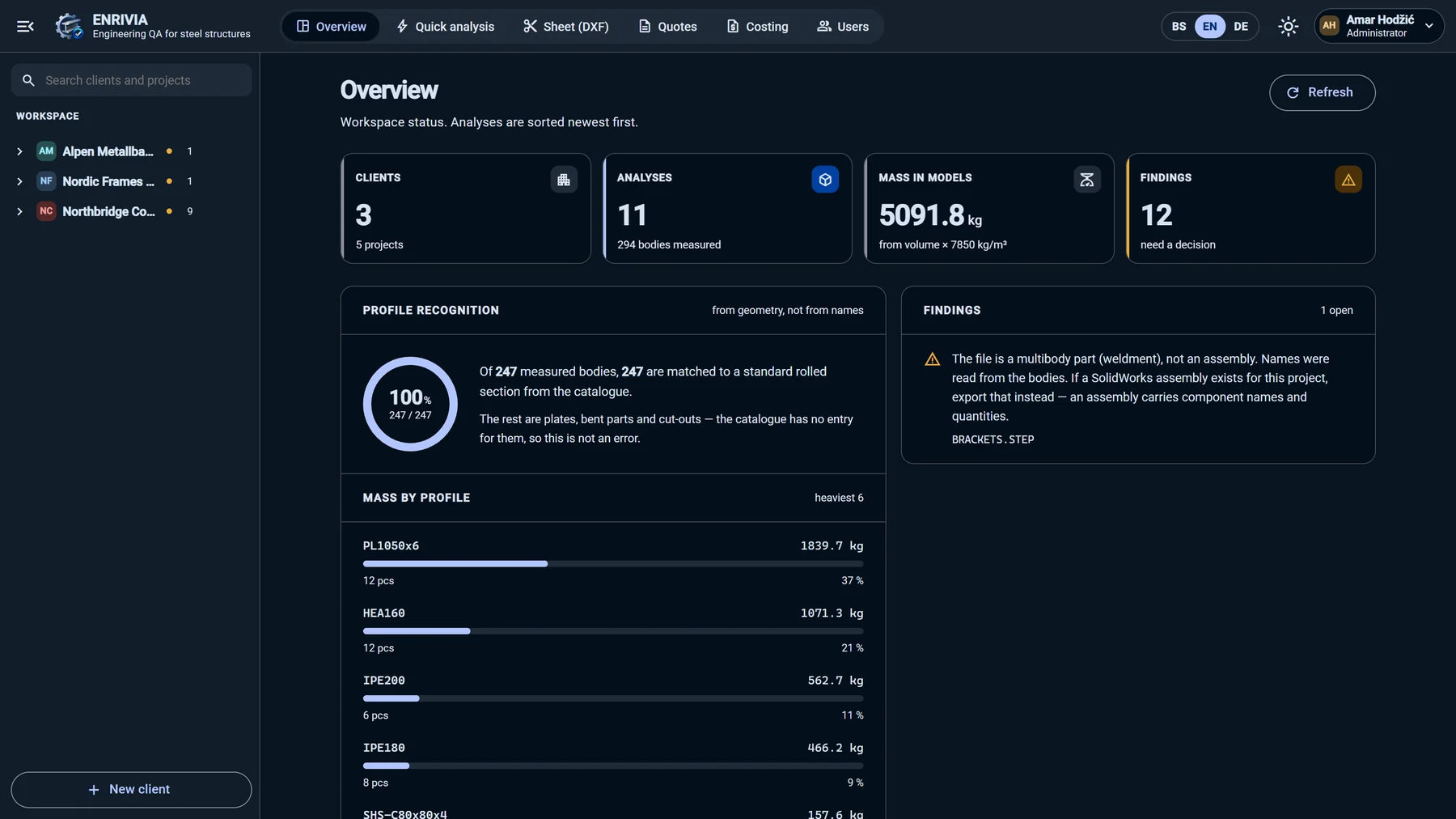
ENRIVIA overview with profile recognition and mass by profile
Profiles recognised 100%
!
BOM check3 mismatches caught
Measured ⌀ 48.30 mm
STEP AP203 · AP214 · AP242HEA · HEB · IPE · UNPSHS · RHS · CHS Plates & cutting contoursWeld schedulesSOLIDWORKS drawings Excel & PDF quotesTrue-shape nestingLaser · press brake · welding · paintingDXF quick quoteEN · DE · BS

The problem

Quoting a steel structure still takes hours. Mistakes show up in the workshop.

01

Manual take-off

Someone counts profiles, lengths and plates from drawings — and types them into a spreadsheet.

02

BOM ≠ model

The cut list says 4 pieces, the model has 3. Nobody notices until the parts are already cut.

03

Guesswork pricing

Cutting, drilling, welding and coating are estimated by feel instead of measured from the model.

Try it · Live model

Click any part. This is what ENRIVIA sees.

A demo mezzanine platform, measured by ENRIVIA exactly as it would measure yours: every profile, length and mass, the BOM check and the change between two revisions.

  • 36parts, every one recognised
  • 1,596.1 kgweighed from the solid
  • 1.1 sto measure the model
  • 3BOM mismatches caught
  • 60.7 mof weld seams measured
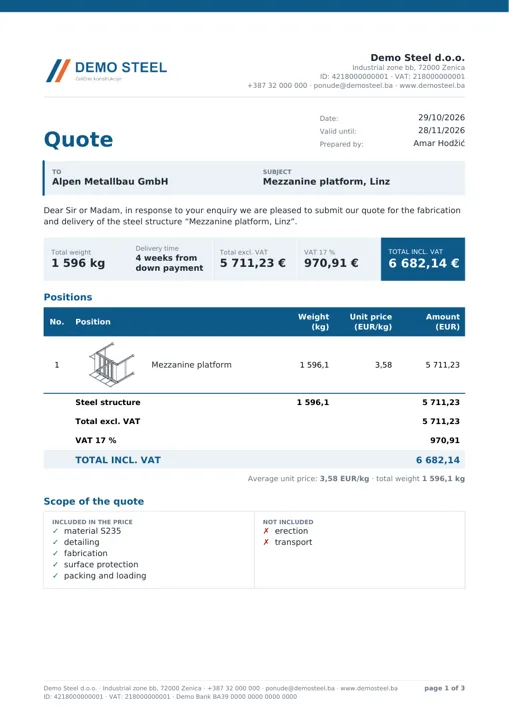
  • € 5,711quote, PDF ready
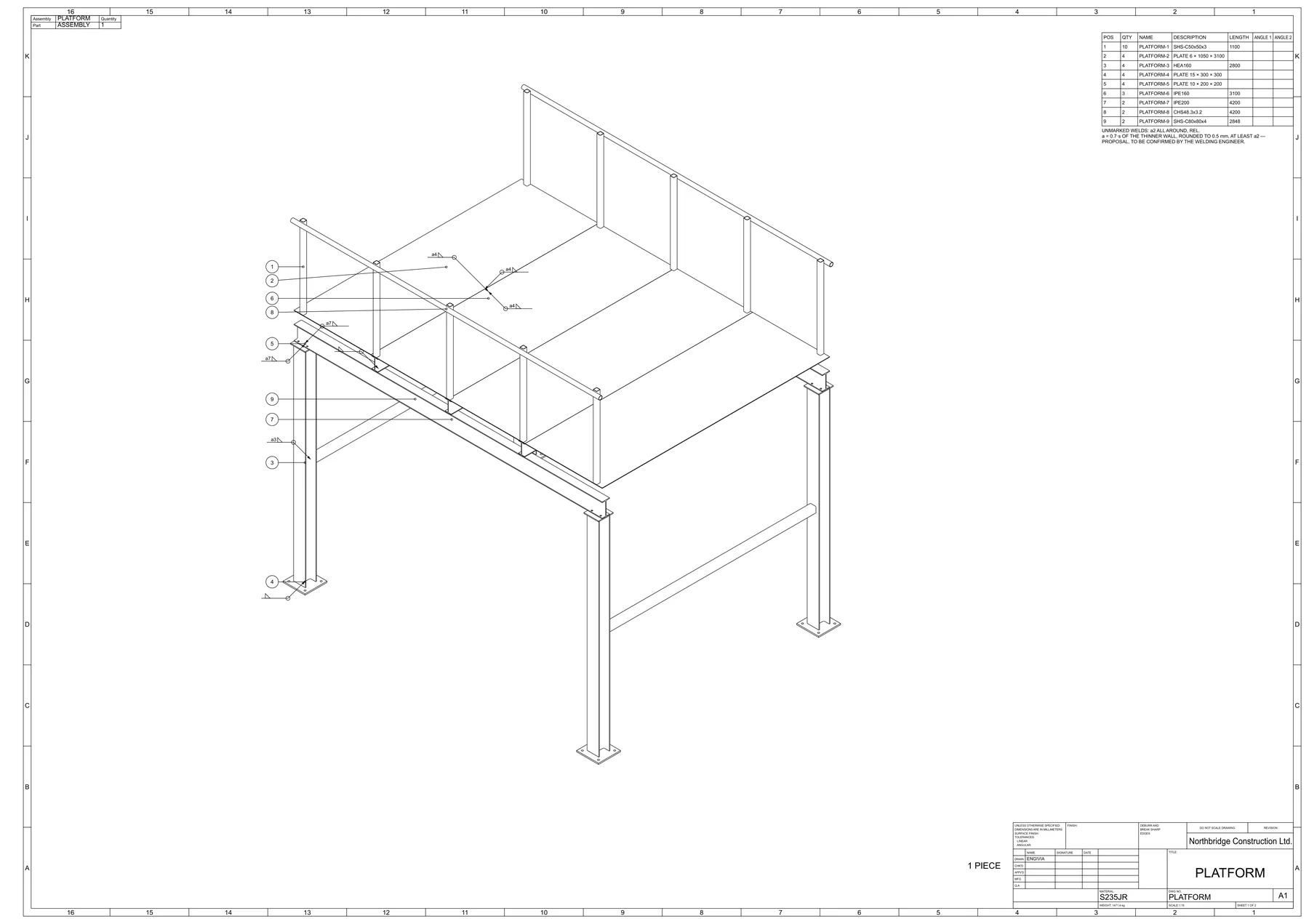
Isometric assembly drawing of the demo mezzanine platform with item balloons

Drag to rotate · click a part · scroll to zoom after a click

What ENRIVIA does

One model in. Checked parts, drawings and a quote out.

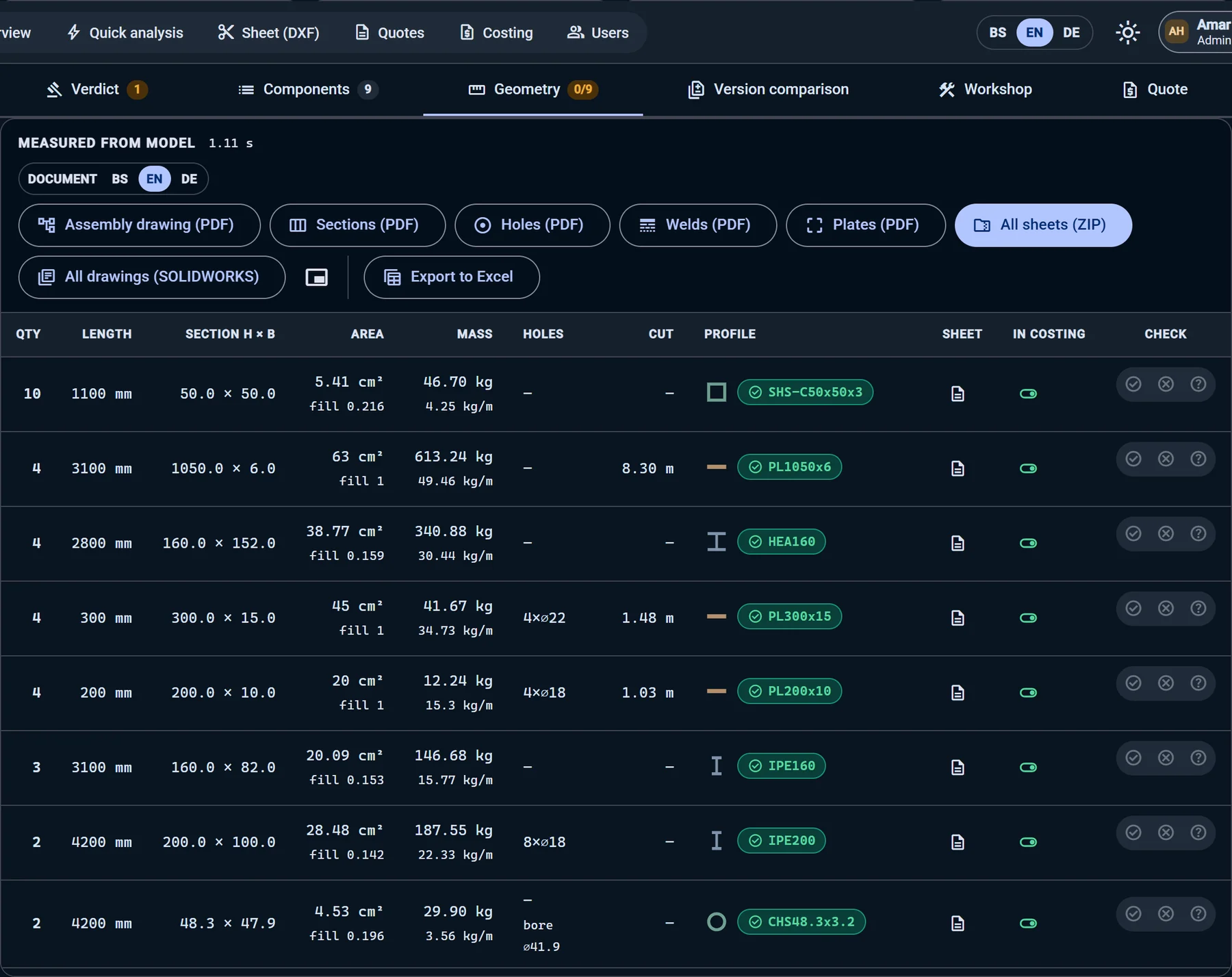
Geometry

Every part measured from the solid — not from its name

Sections, lengths, masses and holes are read from the geometry and matched to the EN profile catalogue: HEA, IPE, SHS, CHS, angles and plates.

  • Profile recognised for every body
  • Mass from volume × 7850 kg/m³
  • Holes and cut lengths per position
Measured parts table with recognised profiles
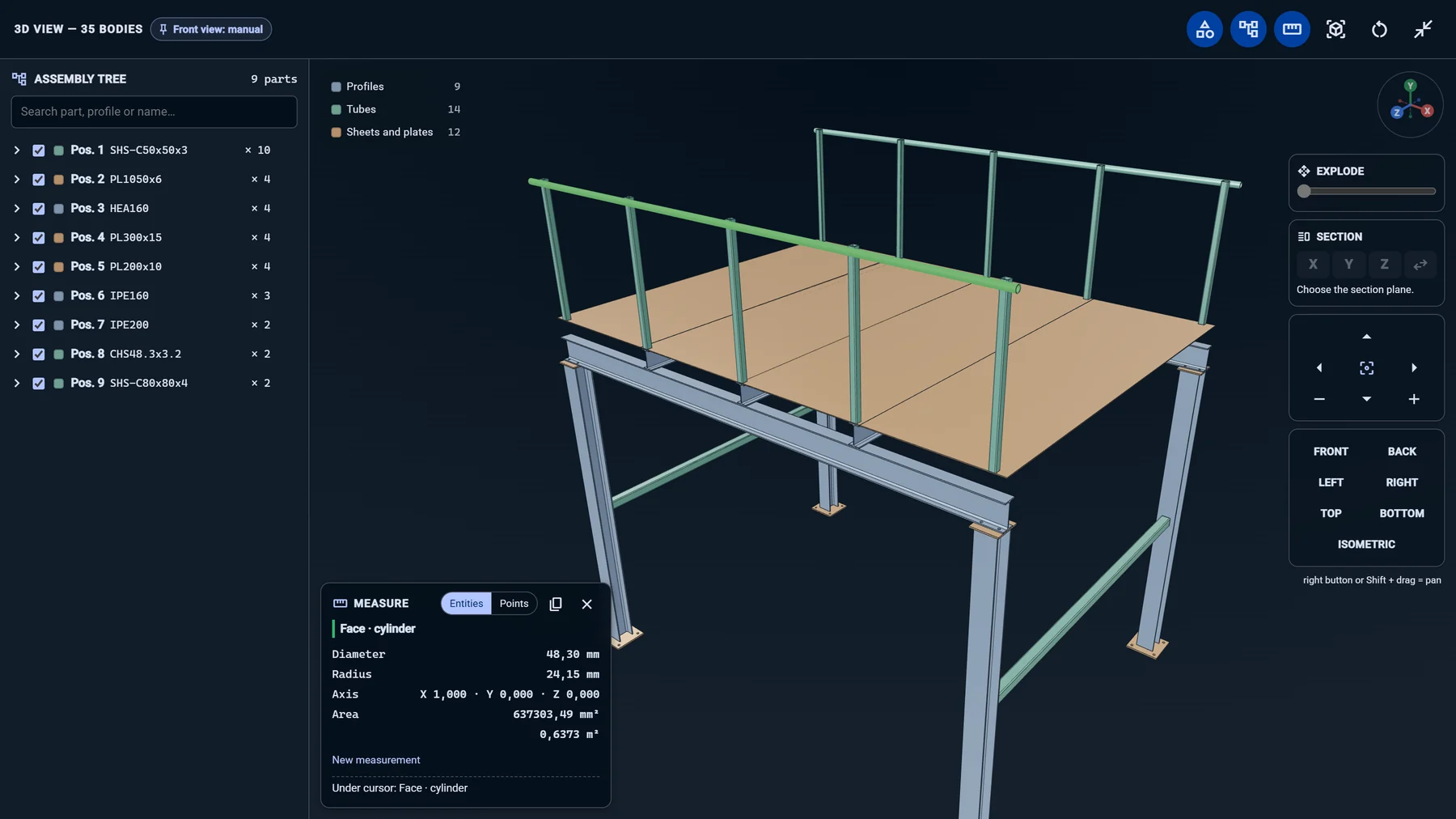
3D viewer

Measure right in the browser

Click a tube, an edge or a hole and get exact CAD dimensions — diameter, length, distance, angle. Anyone in the office can check a model without a CAD seat.

  • Edges, faces, holes and arcs
  • Point-to-point distances
  • Works on any laptop
3D viewer measuring a handrail tube diameter of 48.30 mm
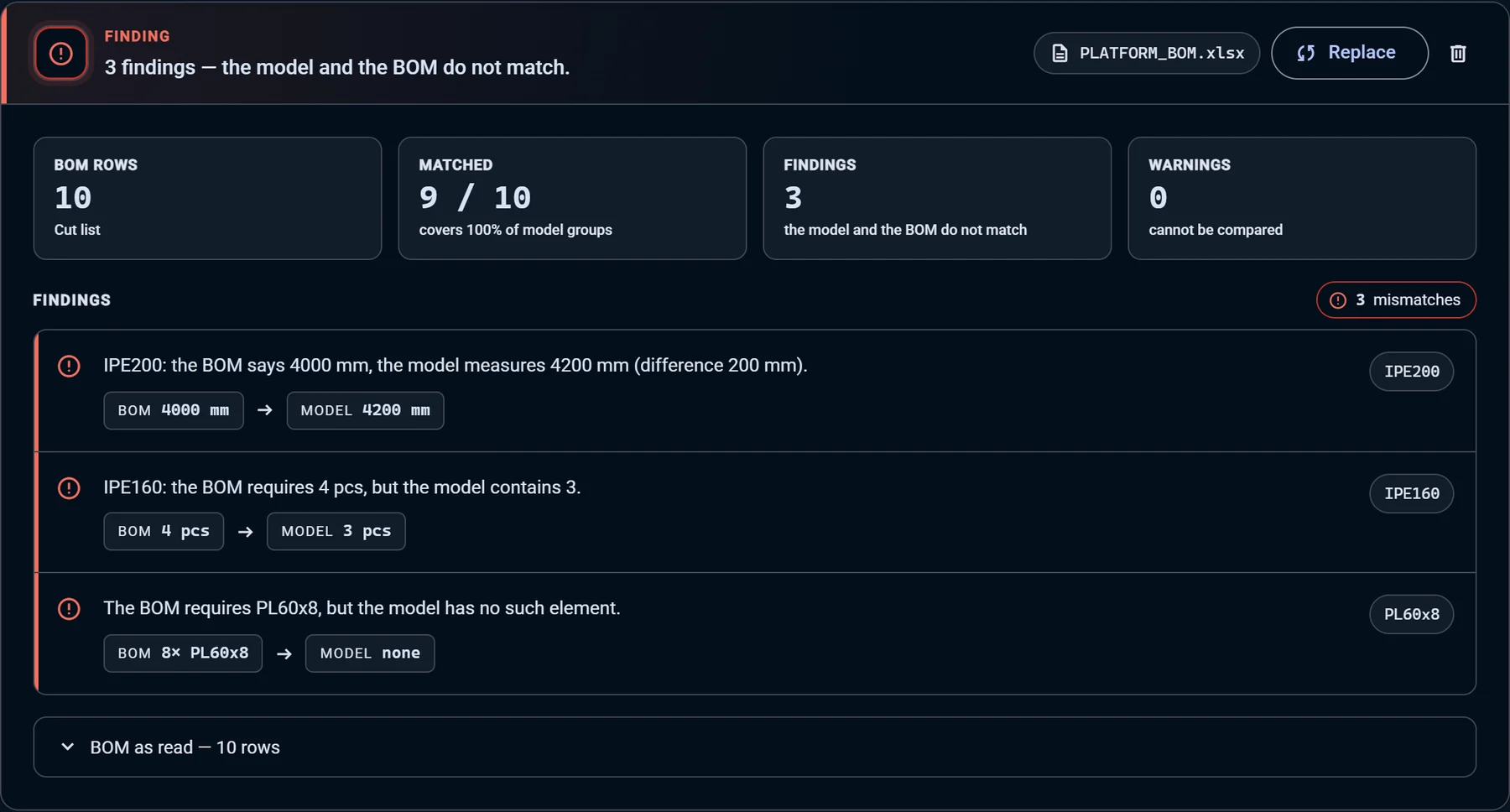
BOM check

BOM vs. model — before production

Upload the cut list from Excel or SOLIDWORKS. Every mismatch is named: which part, what the BOM says and what the model actually contains.

  • Wrong lengths and quantities
  • Parts missing from the model or the BOM
  • Click a finding to see it in 3D
BOM check showing three mismatches between cut list and model
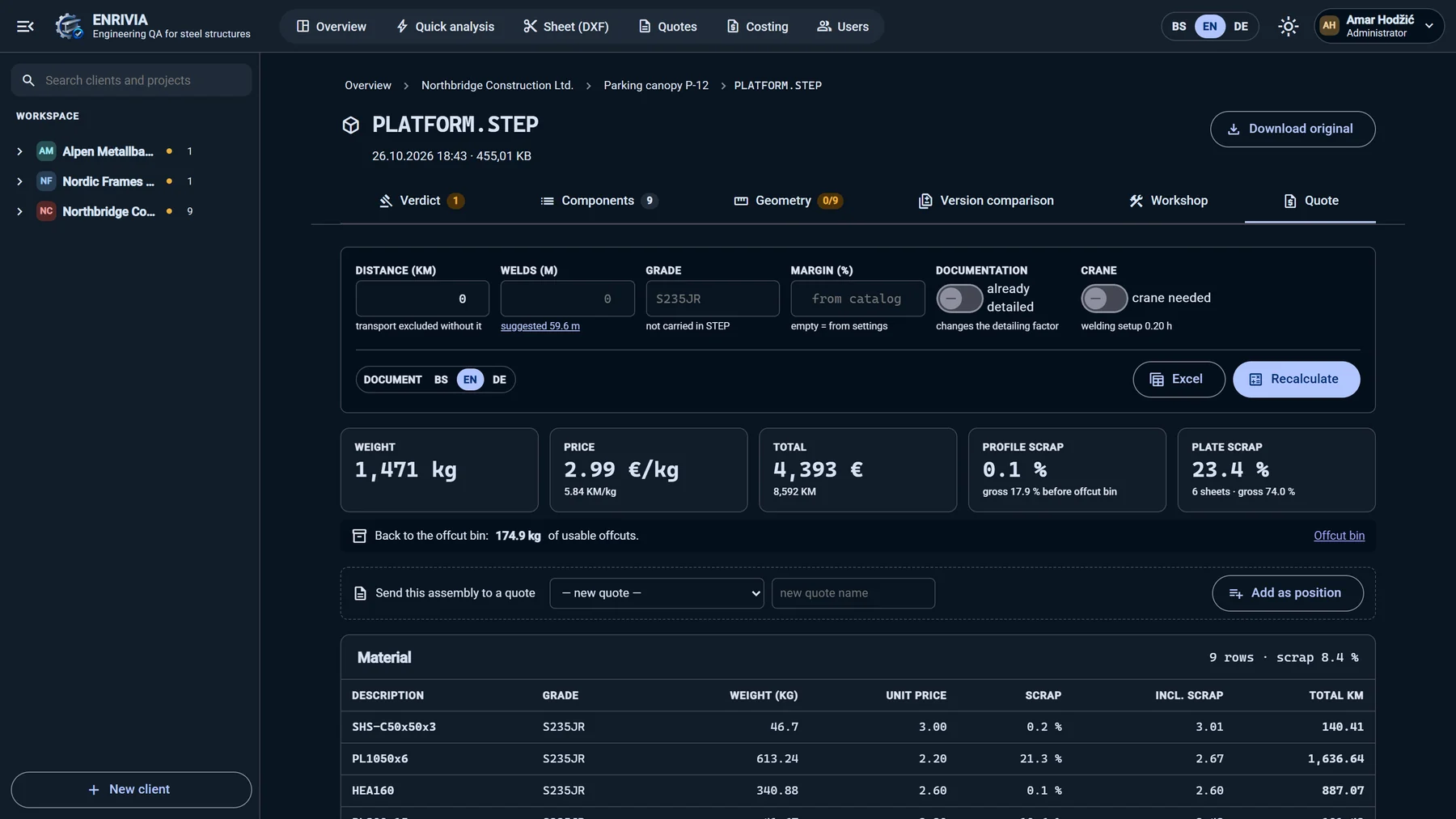
Costing

From model to quote with your own rates

Material, scrap, sawing, drilling, laser, press brake, welding and painting are calculated operation by operation from the model — with your price list, norms and hourly rates. Send a clean PDF to the client in English, German or Bosnian.

  • Bars and true-shape sheet nesting with offcut bin
  • Weld deposit from measured seams, paint by ISO 12944 system
  • Press force checked against your machine
  • Excel for you, PDF for the client
Quote calculated from the model with weight, price per kg and scrap
New · Sheet metal

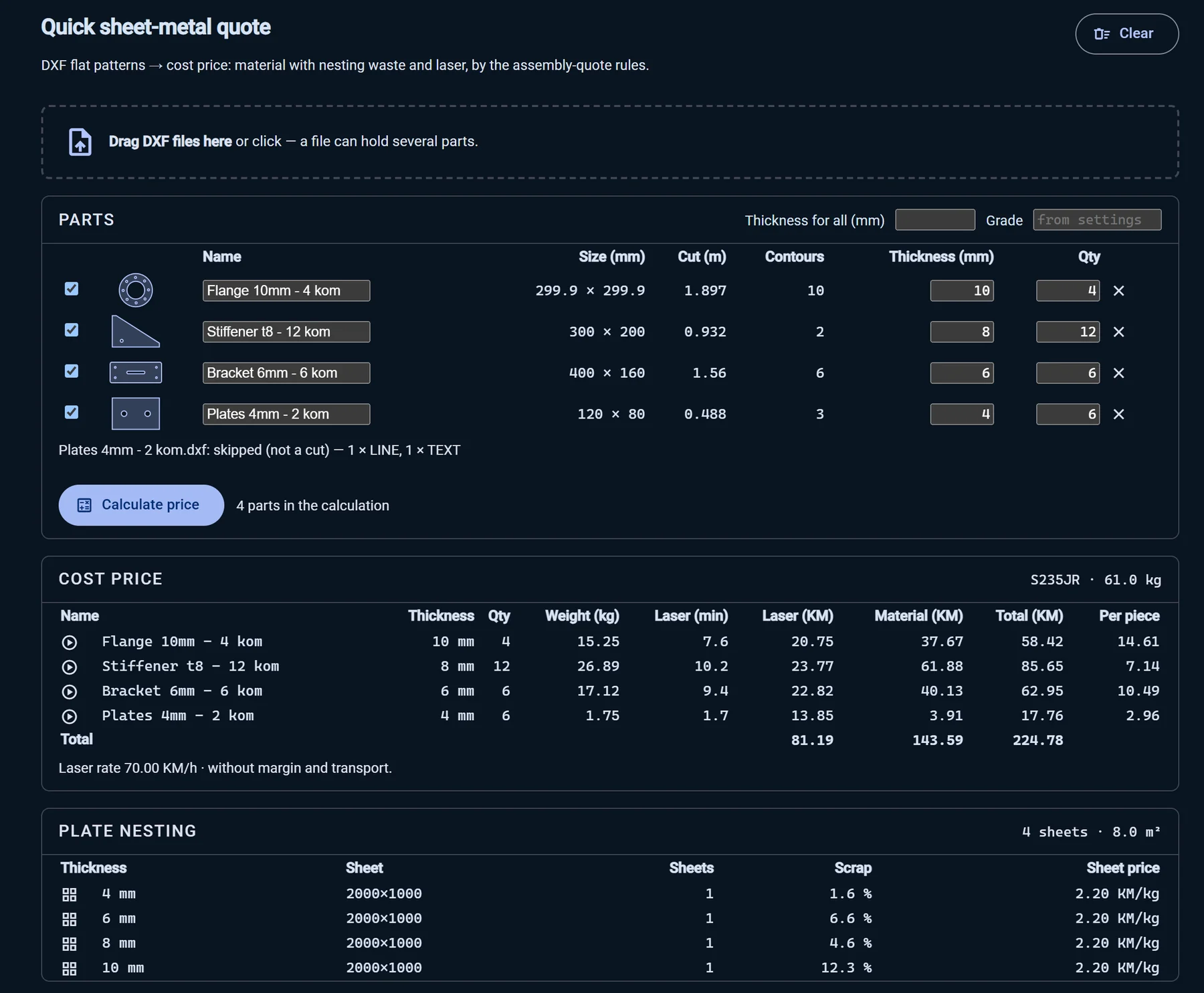
Instant quote from DXF flat patterns

A customer sends ten DXF files and asks for a price. Drop them in — quantity and thickness are read straight from the file names, the parts are nested by shape and the laser time is calculated. Price per part in seconds, by the same rules as your assembly quotes.

  • Several parts per file, annotations skipped
  • “Flange 10mm - 4 kom.dxf” → 10 mm, 4 pieces
  • Material with nesting scrap + laser per part
Quick sheet-metal quote from four DXF files with cost price per part and plate nesting
Revisions

What changed in the new revision?

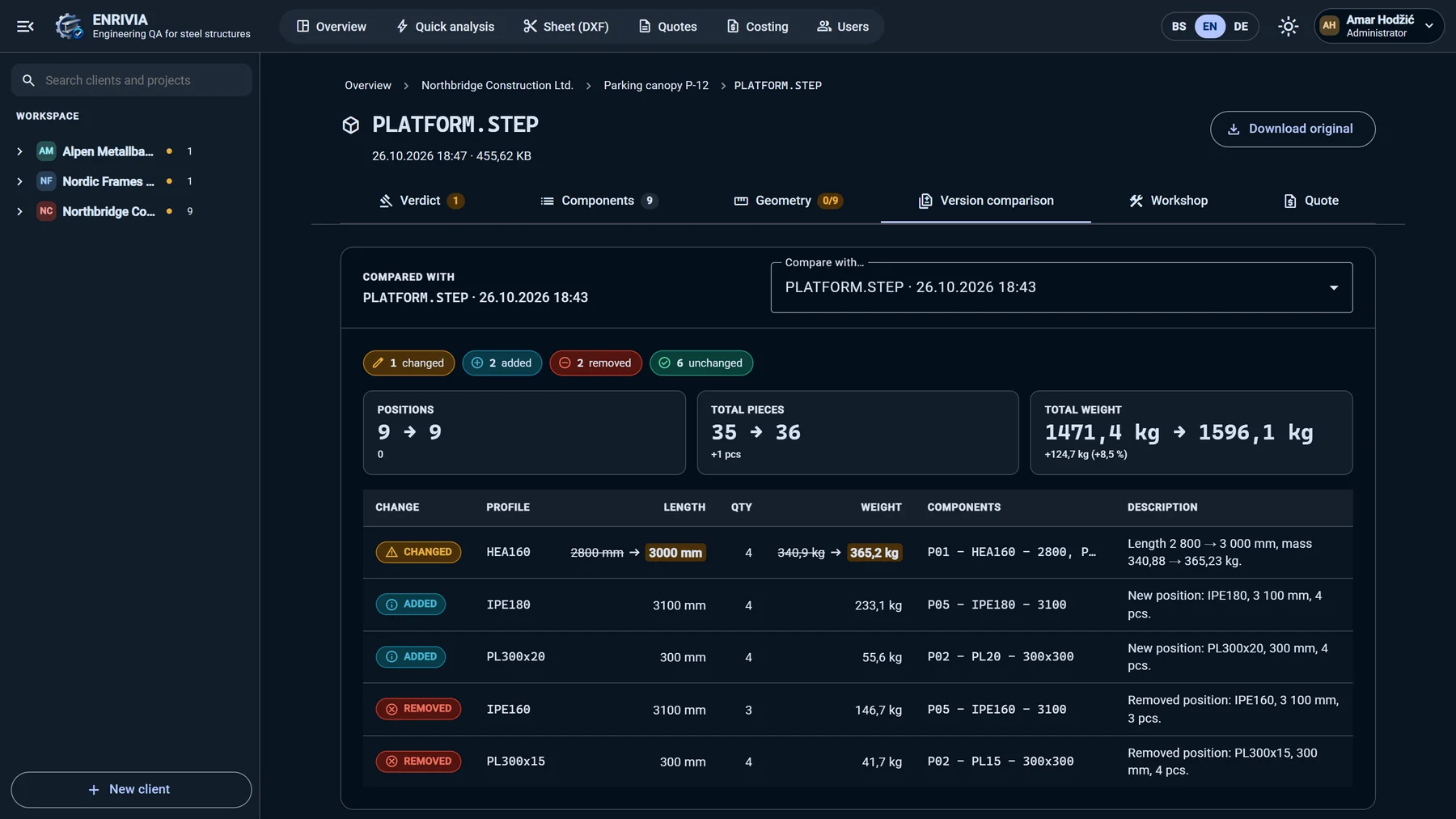
Upload the next version of the same model. ENRIVIA lists every changed, added and removed position — with old and new length, quantity and weight.

  • Changed, added, removed, unchanged
  • Total pieces and weight delta
  • Compare any two versions
Version comparison listing changed, added and removed positions
Batch compare

Find identical assemblies across a whole series

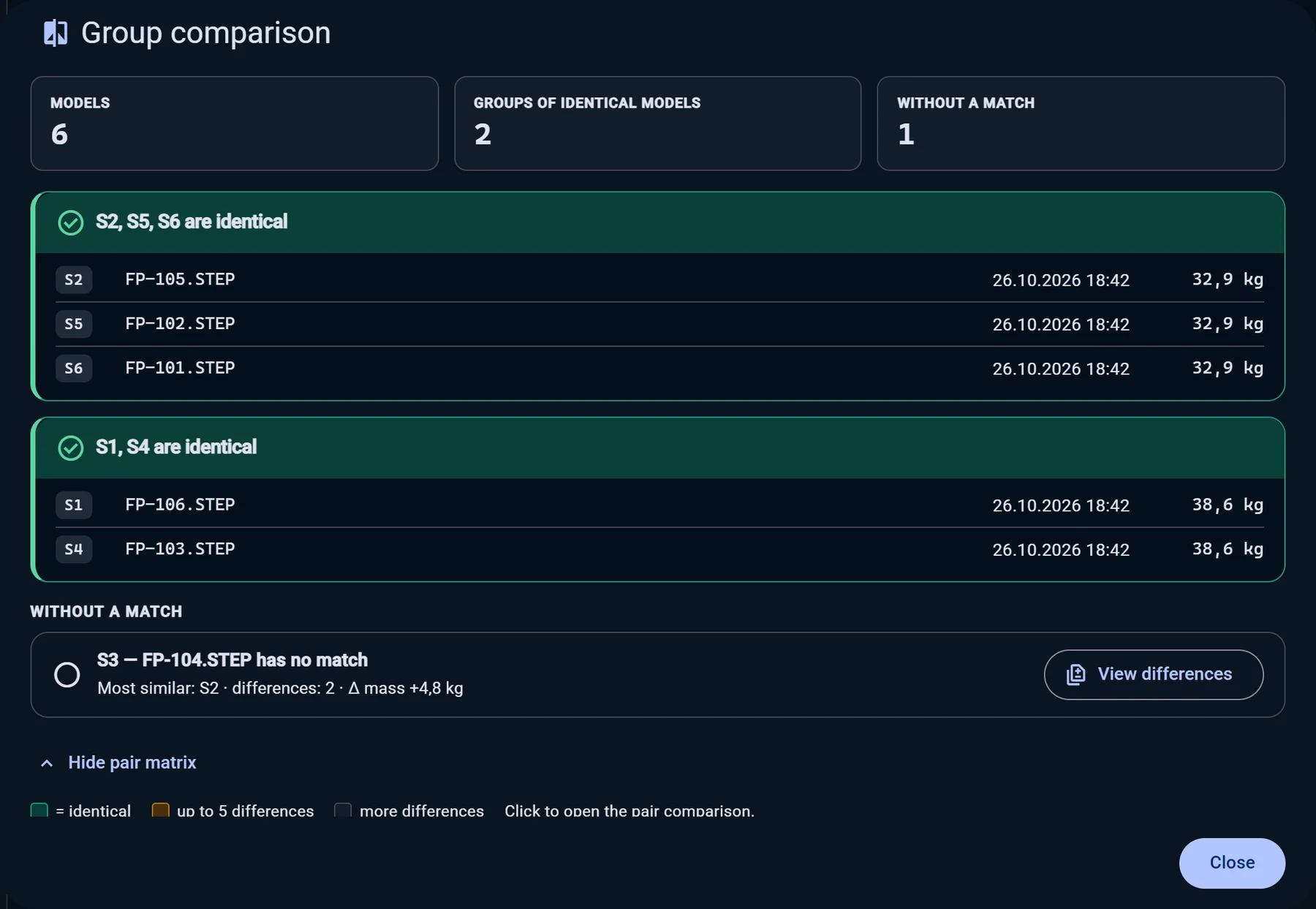
Tick ten STEP files and see at once which ones are the same — and which one is different, with the closest match and what differs.

  • Groups of identical models
  • Pair matrix for the whole series
  • Quote once, build many
Batch comparison grouping six fence panels into identical groups

New · Simulation

See the job run before it reaches the shop

Every animation is driven by the measured model: the parts the laser cuts, the order of the bends, the passes of a weld and the coats of paint. What you see is what the quote is charging for.

Laser cutting

True-shape nesting, cut in order

Parts are nested by their real outline — flanges in a honeycomb, stiffeners turned into each other. The head cuts holes first, then the outline, and every metre and pierce goes into the price.

Press brake

Bend by bend, from the measured profile

The flat blank comes from the model, the bends run in order and the force is checked against your press — before the part is cut.

  • Weld passes from the measured seam
  • Wet painting by ISO 12944
  • Flat blank with K-factor
  • Press force & length check
  • Laser speed calibrated from your CAM

Drawings

Workshop-ready sheets, generated from the model

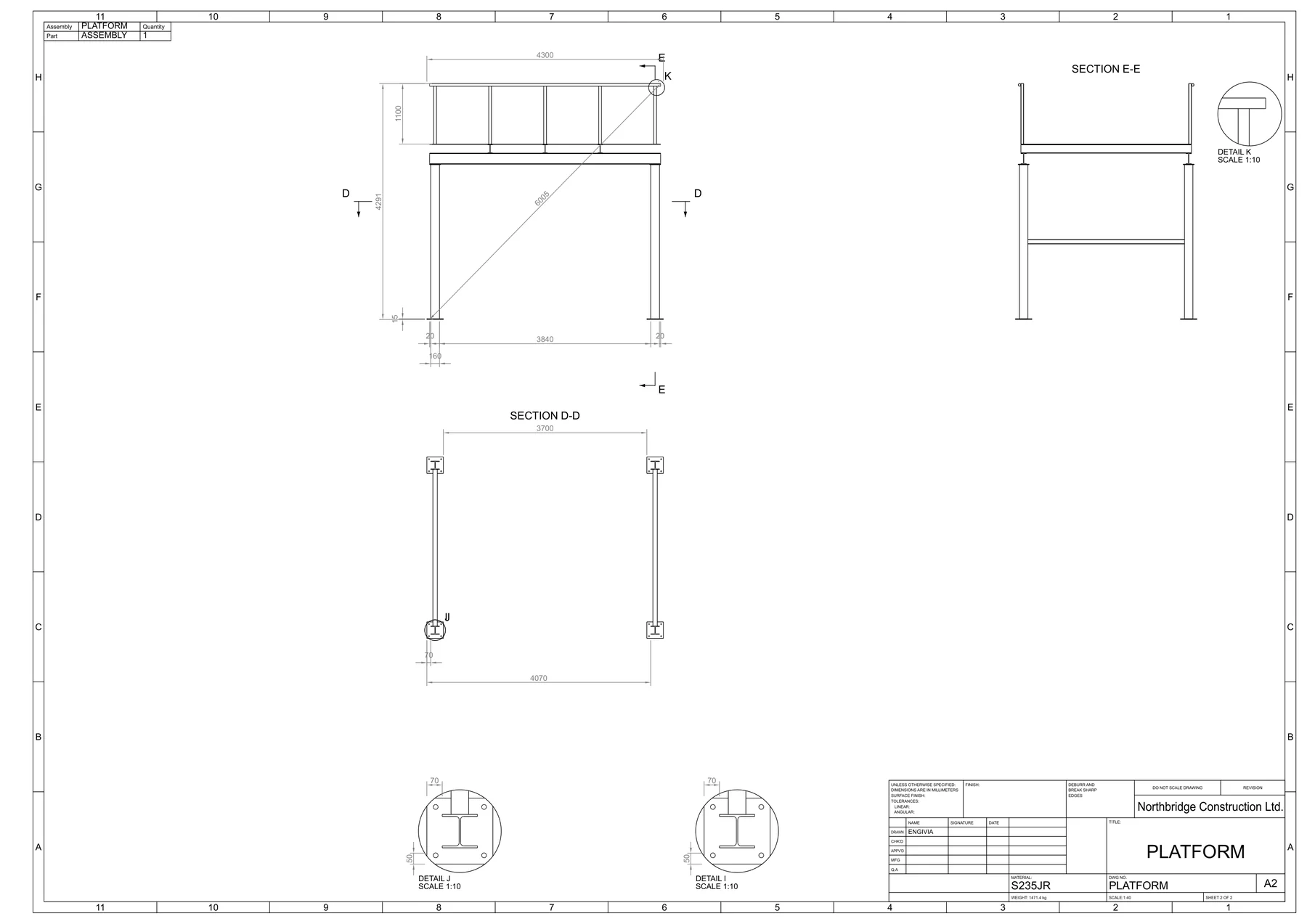
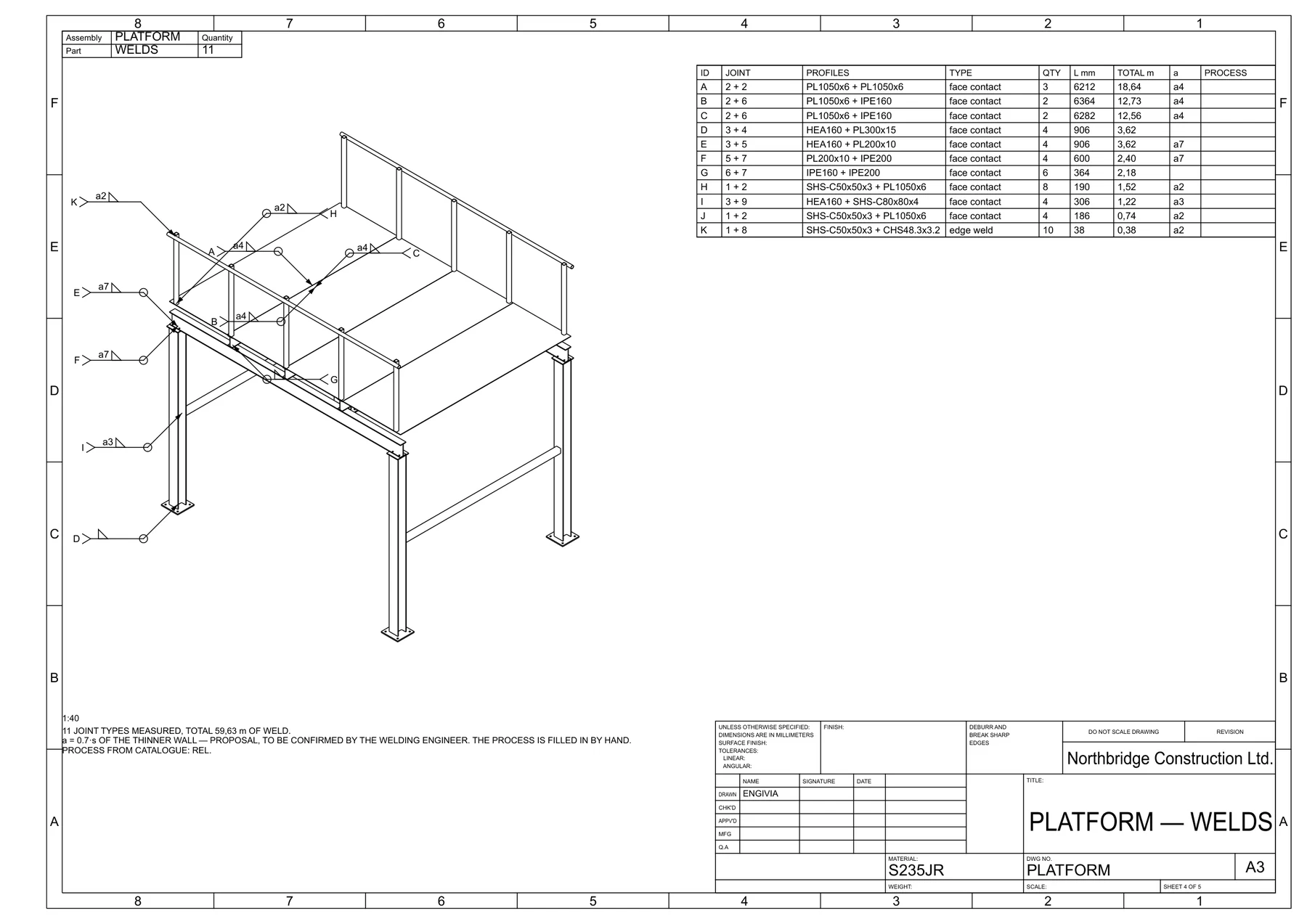
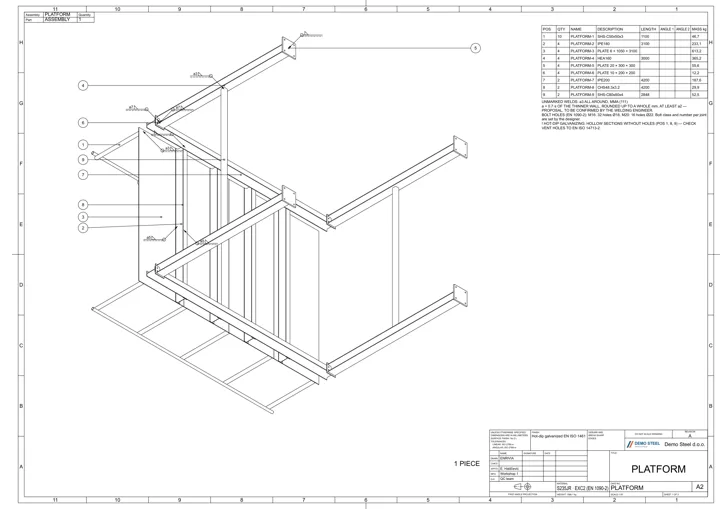
Rotate the model, pin the assembly front view — every sheet follows it. Assembly with item balloons, weld schedule, plate cutting contours, sections and details.

Assembly views with sections and details
Weld schedule sheet
Isometric assembly drawing with item balloons and parts list
  • PDF
  • DXF
  • SOLIDWORKS
  • All sheets as ZIP
  • Your company template

Standards

Built on the standards your inspector checks

Drawings and quotes follow the European rules for steel fabrication — not a house style you have to explain.

  • EN 1090-2

    Execution class on every drawing and quote; bolt hole clearances by bolt size.

  • ISO 5817

    Weld quality level taken from the execution class, written in the weld note.

  • ISO 2553

    Weld symbols with arrow and other side, field welds and seam length.

  • ISO 129-1

    Hole positions as running dimensions from one datum — how the shop marks out.

  • EN 1993-1-8

    Every hole checked for edge distance; too close to the edge is flagged on the sheet.

  • EN ISO 14713-2

    Hollow sections without vent holes are flagged before hot-dip galvanizing.

  • ISO 12944

    Paint systems by corrosivity class, priced by the measured surface.

  • ISO 5456-2 · 5457

    First-angle projection symbol, A-series sheets with frame and centring marks.

How it works

Four steps, one afternoon becomes a coffee break

  1. 1

    Upload the STEP

    Drop the file into the project. The analysis starts on its own.

  2. 2

    Review the findings

    Profiles, masses, holes — and every mismatch with the BOM.

  3. 3

    Generate drawings

    Assembly, welds, plates and sections — PDF, DXF or SOLIDWORKS.

  4. 4

    Send the quote

    Priced with your rates, exported as a clean PDF for the client.

Your numbers

What ENRIVIA saves you, in hours and euros

Move the sliders to match your office. The calculation runs in your browser — nothing is sent anywhere.

Half an hour covers upload, review of the findings and sending the PDF. Change it if your jobs are bigger.

Hours back every month 70
Saved per month€ 2,800
Saved per year€ 33,600
Quotes the same team can send8.0×
Check it on your own model

FAQ

Questions fabricators ask us

Which file formats does ENRIVIA read?

STEP models (.step, .stp) from SOLIDWORKS, Tekla, Inventor, Advance Steel and other CAD systems, plus DXF and DWG drawings. BOMs and cut lists come from Excel (.xlsx, .xls) or CSV.

Do we need a CAD licence to use it?

No. ENRIVIA runs in the browser. Estimators, project managers and the workshop can open and measure models without a CAD seat.

Where does the quote price come from?

From your own price list, hourly rates and norms — entered once in the costing catalogue. ENRIVIA measures the quantities; your numbers set the price.

Which languages are supported?

The application and all documents — drawings, Excel and the client PDF — are available in English, German and Bosnian. You choose the document language per download.

Where is our data stored?

We install ENRIVIA on your own server or host a dedicated instance for your company. Your models and prices are never shared with anyone else.

Contact

See ENRIVIA on your own model

Send us a short note. We will set up a live demo with one of your STEP files and show you the findings, drawings and quote — in about 30 minutes.

  • Live demo on your own model
  • Answer within one working day
  • English, Deutsch or Bosanski

We only use your details to answer this request.